From Spec Sheet to PIM: Automating Product Data Extraction
The gap between spec sheets and PIM systems, with a real walkthrough of five extracted datasheets landing in a PIM as typed, unit-aware attributes.
Your PIM system is supposed to be the single source of truth for product data. But right now, some of your most critical data lives inside PDF spec sheets that a supplier emailed last quarter: tensile strength values, operating temperature ranges, chemical resistance ratings, dimensional tolerances. Getting that data from the PDF into your PIM means someone opens the file, reads a table, and types values into fields one by one.
This manual bridge between spec sheets and PIM systems is one of the most persistent bottlenecks in product data management. It’s slow, error-prone, and doesn’t scale. And the gap is growing: as companies add more SKUs, expand into more markets, and onboard more suppliers, the volume of spec sheets that need to be ingested keeps climbing while the process stays manual.
This article covers why spec sheet-to-PIM data import is harder than it looks, where the errors happen, and how structured extraction eliminates the manual step. Further down, we show it working end to end: five sample supplier datasheets (one of them a German-language transmitter TDS) landing in a live PIM as typed, unit-aware attributes, a product model with variants, and provenance fields, with the screenshots to prove it. Prefer to watch? The whole workflow, in 109 seconds:
The Manual Data Entry Bottleneck
A mid-size industrial distributor might carry 2,000–10,000 SKUs, each backed by supplier documentation. Every new product onboarding means pulling technical attributes from a spec sheet and entering them into PIM fields. For a typical 4-page technical data sheet with 25–40 properties, manual entry takes 30–60 minutes per document.
Scale that up: onboarding 200 new products means 100–200 hours of data entry. That’s 3–5 weeks of someone’s time spent copying values from PDFs into form fields. And this assumes the documents are all in one language. If your suppliers send spec sheets in German, Italian, or Turkish, someone also needs to understand what they’re reading before they can enter it.
The cost isn’t just the labor. It’s the delay. New products can’t appear on e-commerce platforms, in configurators, or in distributor catalogs until the PIM data is populated. Every week of data entry backlog is a week of lost sales opportunity.
Why Error Rates in Manual PIM Entry Are So High
Human data entry error rates for structured data sit around 1–4%, depending on the complexity of the source material (Goldberg et al., 2008 measured 3.6% in structured medical data entry; the rate is comparable for any repetitive transcription task). On a spec sheet with 30 properties, that translates to 1–2 errors per document on average.
But the real problem is the type of errors. In PIM data, the most damaging mistakes are:
- Transposed decimals. A thermal conductivity of 0.23 W/mK entered as 2.3 W/mK. The value looks plausible enough that nobody catches it in review, but it’s off by a factor of 10.
- Swapped units. The spec sheet says 350 bar. The PIM field expects PSI. Someone enters 350 PSI, a 24x understatement of the actual pressure rating.
- Misattributed values. The document lists two variants. The data entry person copies a value from Variant A into the Variant B record. Both records now show the wrong product.
- Missing fields. A property is present in the spec sheet but the data entry person skips it, either because they didn’t notice it or because they weren’t sure which PIM field it maps to.
These errors compound downstream. A wrong value in the PIM propagates to every channel that reads from it: the website, the catalog, the configurator, the ERP. By the time someone notices, the incorrect data has been published in multiple places.
The Field Mapping Problem
Even when the values are correct, getting them into the right PIM fields is its own challenge. Spec sheets don’t follow a universal schema. Every supplier structures their documentation differently:
- One supplier calls it “Operating temperature”, another calls it “Service temperature range”, a third writes “Temp. range (operating)”.
- One supplier separates value and unit (“45” + “cSt”). Another combines them (“45 cSt @ 40°C”). A third embeds the test standard in the same cell (“45 cSt per ISO 2431”).
- Some properties appear as table rows. Others are embedded in running text. Others are in footnotes or header metadata.
Your PIM has a fixed schema: defined fields, expected formats, controlled vocabularies. The spec sheet has whatever the supplier decided to put on the page. Bridging that gap requires someone who understands both the document’s content and the PIM’s data model. That’s a skilled task, not simple data entry, and it’s the part that takes the most time per document.
Why Generic PDF Extraction Doesn’t Solve It
PDF-to-text tools and generic table extractors can pull raw content from a document, but they don’t solve the PIM import problem. What they give you is unstructured text or, at best, a grid of cells that mirrors the visual layout of the PDF.
What they don’t give you:
- Semantic labeling. Is “45” a viscosity, a temperature, or a hardness value? A raw extractor doesn’t know.
- Separated fields. The property name, value, unit, test standard, and conditions need to be in separate fields for PIM import. Raw extraction gives you one blob.
- Domain awareness. In the coatings industry, “DFT” means dry film thickness. In electronics, “DFT” might mean design for test. A generic tool can’t resolve these ambiguities.
- Validation. Raw extraction has no way to check whether the output is complete or consistent with the source.
The result: you get text that still needs manual interpretation, field assignment, and validation. The bottleneck moves from “reading the PDF” to “cleaning the extraction output”, which often takes just as long.
Structured Extraction: Data That Maps to PIM Fields
The approach that actually eliminates the manual step is structured extraction: turning a spec sheet into labeled, typed, separated data that corresponds directly to PIM fields. Not raw text. Not a visual table replica. Actual structured data.
SpecMake’s extraction pipeline reads the document using AI that understands both the visual layout and the technical content. It identifies each property, associates it with its value, separates the unit, notes the test standard, and detects the industry domain automatically. The output is structured JSON where every field is already labeled and separated:
{
  "sections": [
    {
      "title": "Battery Specifications",
      "rows": [
        {
          "property": "Nominal voltage",
          "value": "51.2",
          "unit": "V"
        },
        {
          "property": "Rated capacity",
          "value": "100",
          "unit": "Ah"
        },
        {
          "property": "Cycle life",
          "value": "6000 cycles",
          "conditions": "at 80 % DoD"
        }
      ]
    }
  ]
}
This is PIM-ready data. Property names, values, units, test standards, and conditions are already in separate fields. You can map them directly to your PIM schema, manually for the first import or programmatically for recurring imports from the same supplier. Structured data in this format is also the foundation for emerging regulatory requirements like Digital Product Passports, which mandate machine-readable product data across EU markets.
For a deeper look at how the extraction handles irregular tables, symbols, and multi-format documents, see our guide to spec sheet data extraction.
What This Looks Like Inside a PIM: A Real Walkthrough
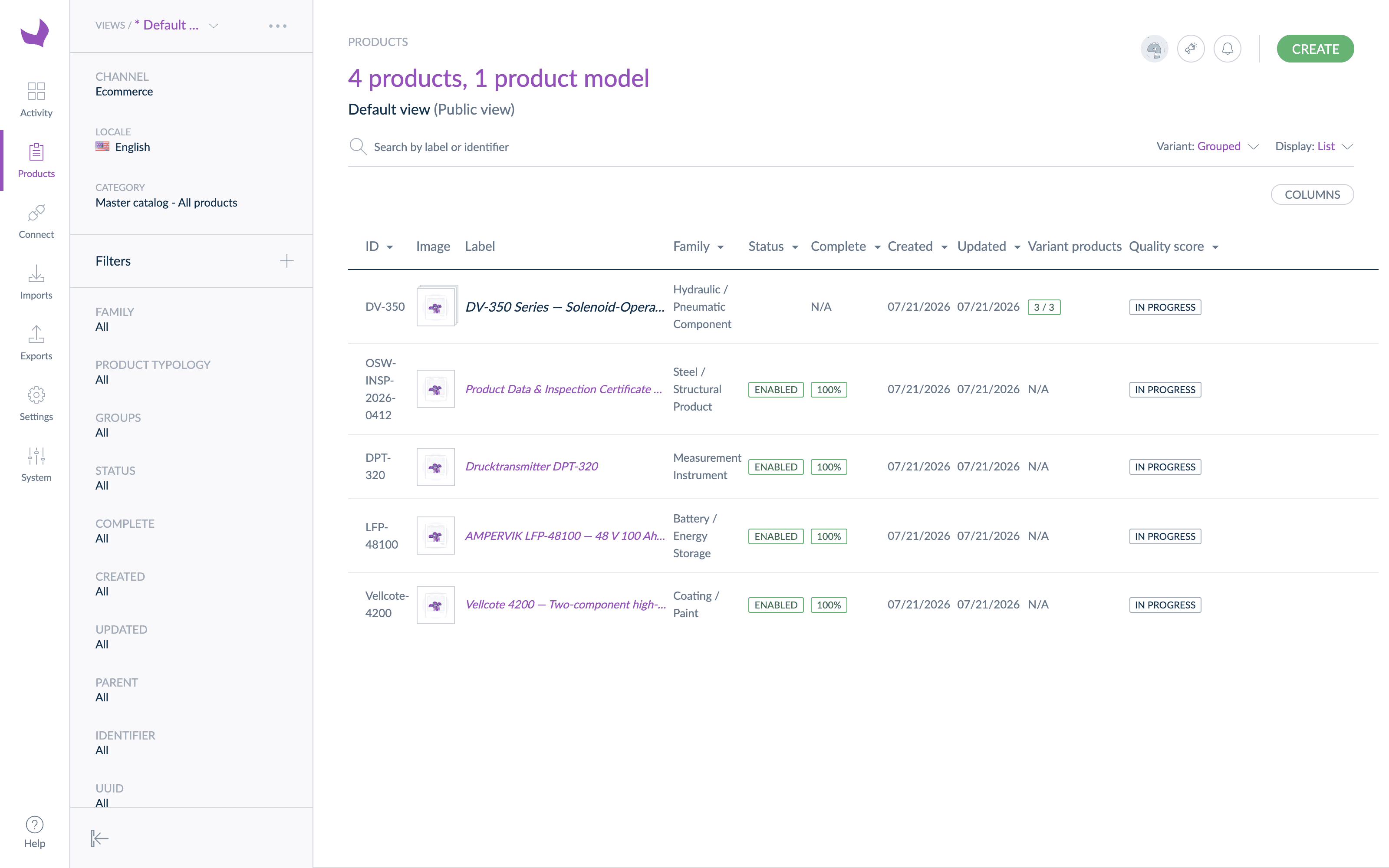
Claims about “PIM-ready data” are easy to make, so we ran the workflow end to end and photographed the result. We processed five demo supplier datasheets through SpecMake and pushed the structured JSON into a PIM through its REST API with a short bridge script. The five covered a battery module, a structural steel section, a hydraulic valve range, a marine coating, and a pressure transmitter whose datasheet was in German. (The manufacturers in these datasheets are fictional, and the datasheets are samples we built to read like the ones suppliers send; the extraction and the PIM are real.) The PIM in the screenshots is Akeneo (Community Edition); the same workflow applies to any PIM that accepts data over an API or a structured import. Since this walkthrough was recorded, Akeneo sync has become a built-in SpecMake feature: preview the field mapping against your own attribute set, approve it, and push from the product page, no bridge script required.
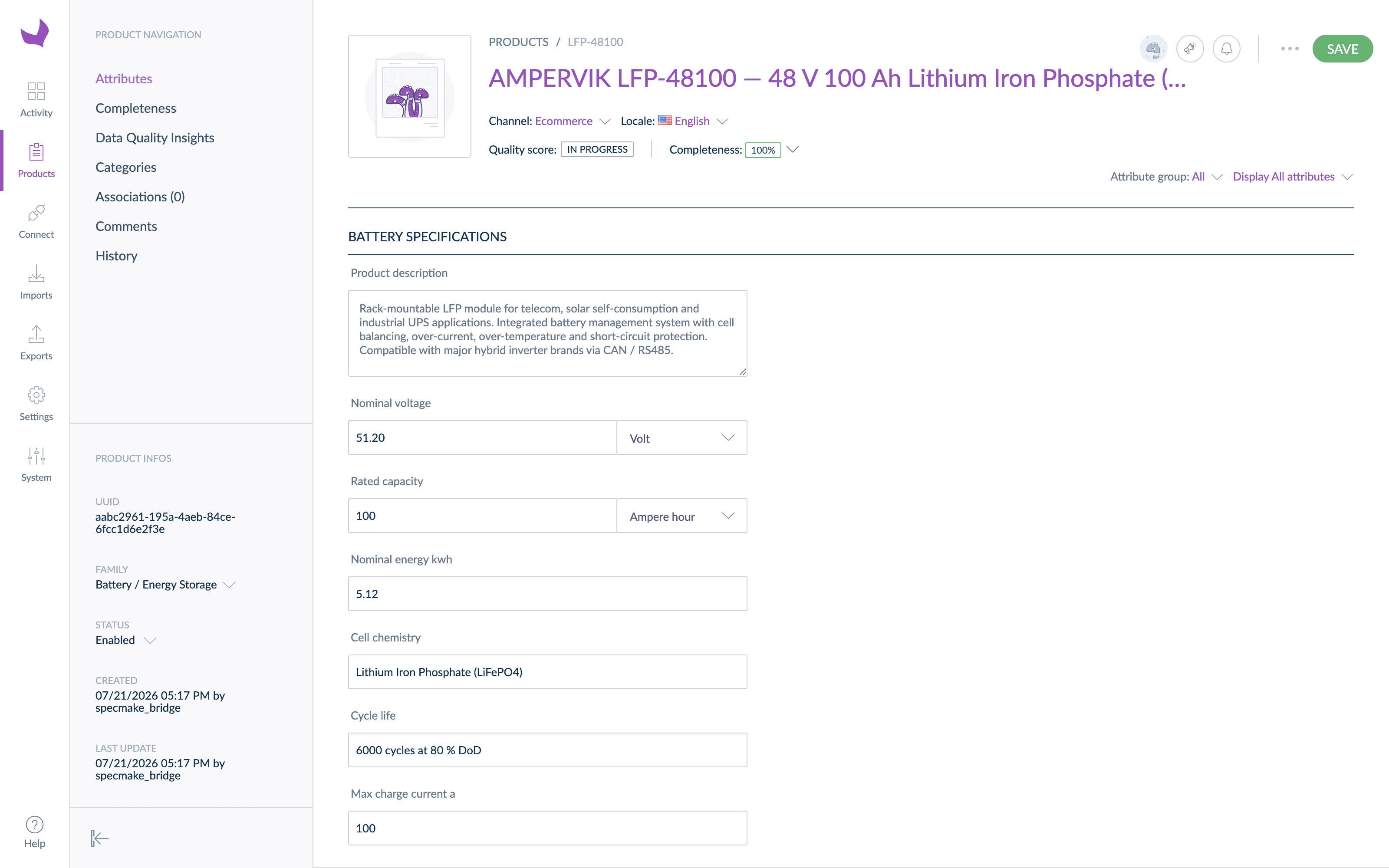
The detail that matters is how the values arrived. A PIM distinguishes between a text field that happens to contain “51.2 V” and a measurement attribute that stores the number and the unit separately. Only the second kind can be validated, converted, and compared. Because the extraction already separates value from unit, the bridge could write real measurement attributes:
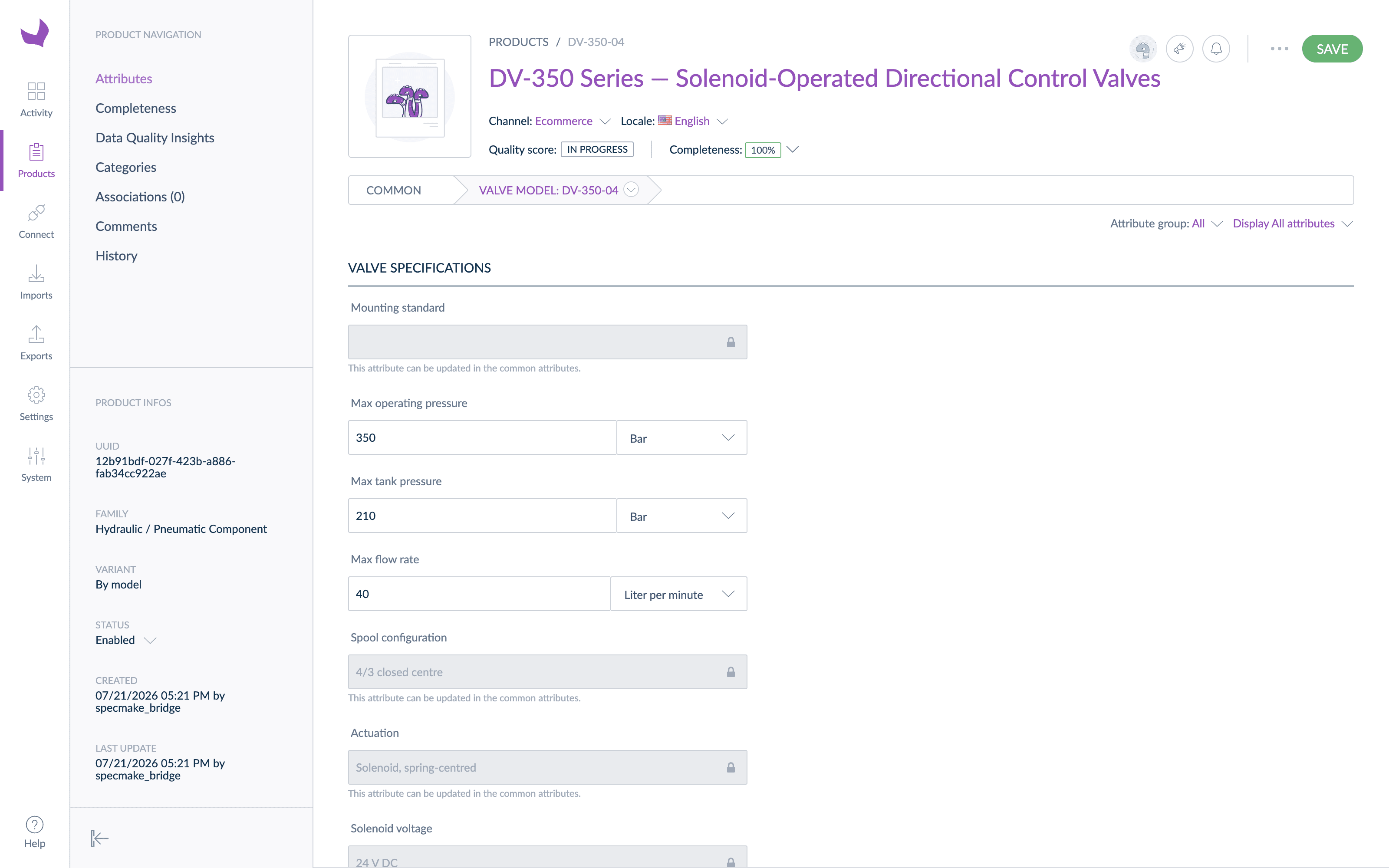
The valve datasheet was the interesting case. One document specified three model sizes side by side in a three-column table. Flattened naively, that becomes three near-duplicate records. Modeled properly, it becomes a product model with three variants: attributes with identical values across the range (mounting standard, spool configuration, actuation) live once on the parent, and only the values that genuinely differ (pressure ratings, flow rate, mass) live on each variant. The split fell out of the data itself: same value across all three columns means common, different values mean variant-level.
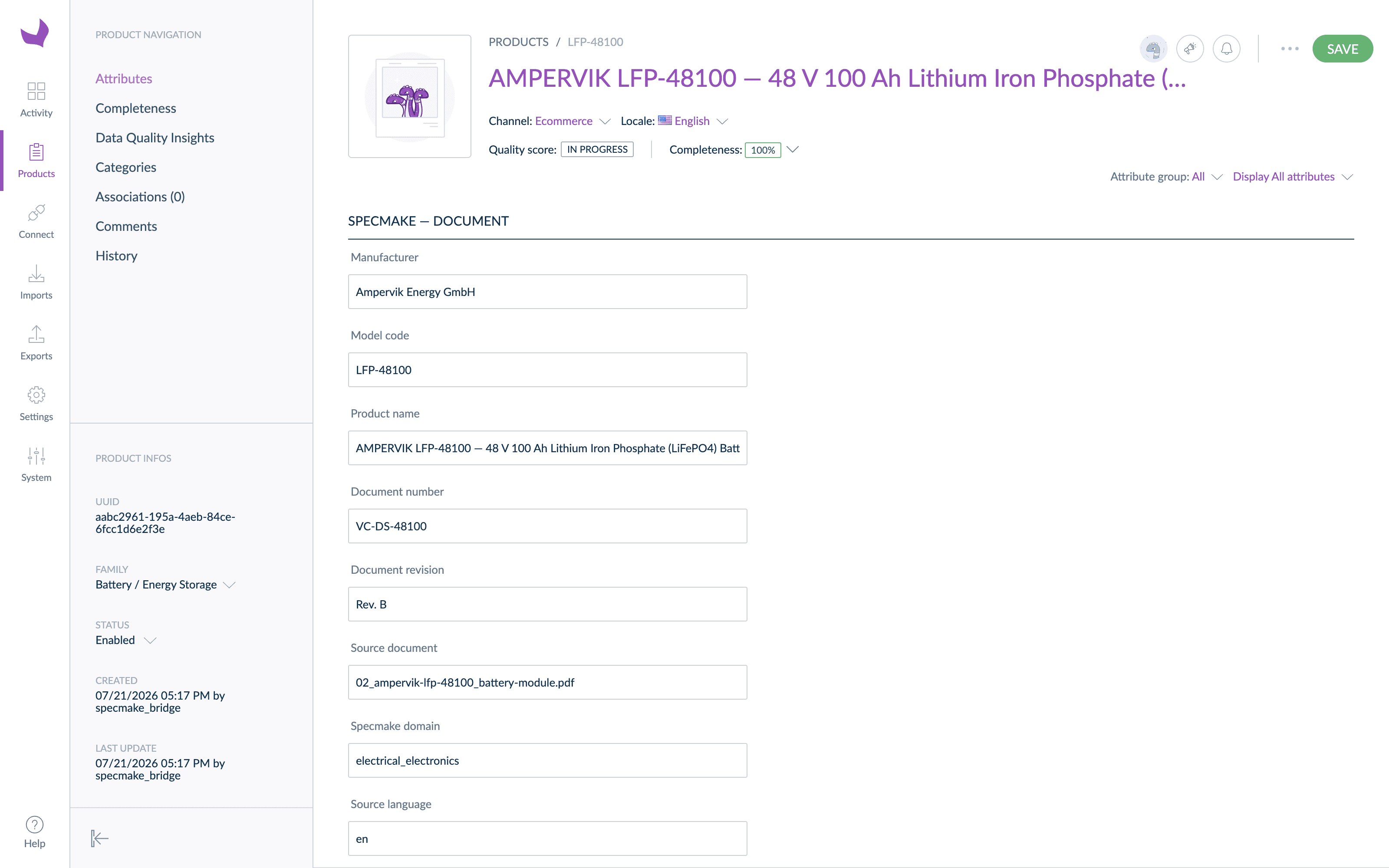
Every record also carries its provenance: which source document it came from, the document revision, the detected industry domain, and the source language. When a value is questioned eighteen months later, the PIM record points straight back to the PDF it came from.
One honest observation from the run: just over 80% of the extracted fields mapped automatically to typed attributes. The remainder, supplier-specific rows like application-method tables and inspection-certificate details, landed in a catch-all text attribute rather than being lost. That long tail is normal: it is the per-catalog mapping work that any PIM onboarding project scopes, and having it isolated in one attribute makes the remaining work visible instead of hidden across a thousand records.
Audit Before Import: Catching Errors at the Source
Structured extraction alone isn’t enough for reliable PIM import. The source document itself may contain errors: a missing value, a unit that contradicts the column header, a property mentioned in the description but absent from the data table. If these errors make it into your PIM, they propagate to every downstream system.
SpecMake’s quality audit runs automatically after every extraction. It compares the structured output against the source document and flags:
- Properties in the source that weren’t extracted (coverage gaps)
- Values that appear inconsistent with their units or property type
- Internal contradictions between different sections of the document
- Sections present in the source but missing from the structured output
For PIM data management, this is critical. You’re not just catching extraction errors; you’re catching source document errors before they enter your system of record. A supplier spec sheet with a missing flash point value is a problem regardless of whether it was extracted correctly. The audit surfaces it so you can resolve it before publishing.
The JSON Export Workflow for PIM Import
Here’s the practical workflow for getting spec sheet data into your PIM system:
- Create a SpecMake account and upload your spec sheet. PDF or DOCX, any language.
- Select zero target languages to skip translation; the system runs extraction and audit only.
- Review the audit results. Check any flagged items before exporting.
- Export as JSON. The structured data downloads as a JSON file with each property, value, unit, test standard and condition in separate fields.
- Import into your PIM. Map the JSON fields to your PIM schema. Most PIM systems accept JSON import directly or via a simple transformation script.
The extraction and audit take a couple of minutes per document. For batch onboarding, you can process documents sequentially and accumulate the JSON exports for a single PIM import batch.
Teams that want to skip the download-and-upload step entirely can use SpecMake’s REST API (included from the Pilot plan): submit documents programmatically and receive the same structured JSON straight into your PIM onboarding pipeline, with per-call token and cost transparency built into every response.
Multilingual Spec Sheets and PIM
If your suppliers send spec sheets in multiple languages, the PIM import problem gets worse. A German-language TDS needs to be both understood and translated before the data can be entered into an English-language PIM. That’s two steps, interpretation and entry, each with its own error rate.
SpecMake’s extraction works on documents in any language. The AI model reads the source document, detects the language and industry domain automatically, and outputs the structured data with property names in the source language. If you need the data in English (or any other language), you can select a target language during processing and the structured output will include translated property names and descriptions with domain-accurate terminology, not literal translations.
This means a spec sheet in Italian produces the same structured JSON as the same product’s spec sheet in English. Your PIM import process doesn’t need to handle language variations. The data arrives normalized. The pressure transmitter in the walkthrough above came from a German-language datasheet: its “Ja” certification entries arrived in the PIM as proper boolean values, alongside the English-source products, with the source language recorded on the record.
When This Approach Pays Off
Automated spec sheet-to-PIM extraction isn’t necessary for every scenario. If you onboard five products a year and your spec sheets are in a language you read fluently, manual entry is fine. The ROI appears when:
- Volume exceeds capacity. More than 20–30 products per quarter, or a backlog that keeps growing because data entry can’t keep pace with product launches.
- Multiple suppliers, multiple formats. Each supplier’s spec sheet uses different layouts, naming conventions, and units. Structured extraction normalizes the output regardless of the source format.
- Foreign-language documents. Spec sheets in languages your team doesn’t read. Manual entry from a document you can’t fully understand is an error factory.
- Data quality matters downstream. When PIM data feeds e-commerce, configurators, or regulatory submissions, the cost of a wrong value in the PIM extends far beyond the PIM itself.
- Audit trail requirements. You need to show which values came from which source documents, and whether any issues were flagged during extraction.
In these scenarios, the time savings are immediate (a couple of minutes per document versus 30–60 minutes), but the bigger value is the reduction in downstream errors. Clean data in the PIM means fewer corrections, fewer customer complaints about wrong specs, and faster time to market for new products.
SpecMake extracts, audits, and structures spec sheet data into the typed, unit-aware form your PIM expects. Want to see the workflow above run on your own datasheets and your own PIM? Apply to the Charter Program or see how extraction works.