Spec Sheet Quality Audit: Catch Errors Before They Reach Customers
Missing values, unit mismatches, internal contradictions: the errors hiding in your spec sheets and how automated auditing catches them.
Most spec sheet errors aren’t caught by the people who read the spec sheet. They’re caught by the people who relied on it: the applicator who mixed the wrong ratio, the engineer who specified a component outside its operating range, the purchasing agent who ordered based on a value that was transcribed wrong three revisions ago.
The problem isn’t that manufacturers don’t care about accuracy. It’s that spec sheets accumulate errors over time through formatting changes, template migrations, multi-language workflows, and the natural drift that happens when documents are updated by different people across different systems. By the time a data sheet has been through four revisions and three translation cycles, nobody has compared the current version against the original lab data in months.
This article covers the types of errors that appear in technical product documentation, why they’re hard to catch manually, and how automated auditing can flag them before they reach customers.
Types of Errors in Technical Spec Sheets
Not all errors are equal. Some are cosmetic; others create safety or compliance risks. Here are the categories that matter:
Missing values
A property is listed but its value is blank, abbreviated beyond recognition, or replaced with a placeholder from a previous template. This happens surprisingly often in multi-product catalogs where a template is filled in for each product variant: someone skips a field, nobody notices.
The impact depends on what’s missing. A missing color code is inconvenient. A missing flash point is a regulatory gap. Safety data sheets (SDS) and technical data sheets (TDS) for chemical products are required to include flash point under EU REACH Regulation (EC) No 1907/2006 and CLP Regulation (EC) No 1272/2008.
Unit mismatches
The column header says °C. The value says 140. But the original lab data was in °F (which would be 60 °C). Or the table says “bar” but the value is actually in PSI. These errors often arise when documents are adapted for different markets without updating the units consistently.
Internal contradictions
The product description says “suitable for temperatures up to 150°C” but the data table lists max operating temperature as 120°C. The application instructions say “2 coats minimum” but the coverage calculation assumes 1 coat. These contradictions are especially common in documents that have been updated section by section over time.
Coverage gaps
Properties that appear in the source document’s running text or section headers but don’t make it into the structured data table. The document mentions “Shore A hardness” in the product description, but no hardness value appears in the specifications table. Either the data was intended to be there and was missed, or the description is referencing something that doesn’t apply; either way, it needs to be resolved.
Formatting ambiguities
Is “1.500” one thousand five hundred (European decimal comma convention) or one and a half (American decimal point)? Is “3/4 inch” a fraction or a date format artifact? These ambiguities are invisible when you read a document in its original language and cultural context, but they become real errors when the data moves between systems.
Why Manual QA Misses These Errors
Most manufacturers do review their spec sheets before publishing. The problem is that manual review is good at catching obvious issues (typos, layout problems, clearly wrong values) and bad at catching the subtle ones:
- Familiarity blindness. The person reviewing the document wrote it (or has reviewed it ten times before). They read what they expect to see, not what’s actually on the page.
- Cross-section checks are tedious. Verifying that a value in the data table matches the claim in the product description requires comparing two different parts of the document. Nobody does this systematically for every property.
- Coverage is uncounted. You can tell if a visible value is wrong, but you can’t tell if a value that should be there is missing, unless you have a checklist of expected properties for that product category. Most teams don’t.
- Foreign-language documents. If the source document is in a language the reviewer doesn’t read, they’re checking layout and numbers only, not semantic accuracy.
Automated Quality Auditing: What It Checks
SpecMake’s quality audit runs on every document processed through the platform. It’s not a spell-checker or a grammar tool; it’s a structured comparison between the source document and the extracted output.
The audit compares three things:
- Source coverage. Every property, value, and section heading visible in the original document is checked against the extracted structured data. If something appears in the source but not in the output, it’s flagged as a potential gap.
- Internal consistency. Values mentioned in different parts of the document are compared. If the product description says one thing and the data table says another, that contradiction is flagged.
- Value plausibility. While the audit doesn’t know the “correct” value for every property, it can flag values that look unusual: a unit that doesn’t match the property type, a missing unit on a numerical value, or a range where the minimum exceeds the maximum.
What Audit Results Look Like
Here is one. We built a hydraulic valve datasheet around a defect we see constantly in real supplier documents: the introductory text claims a maximum operating pressure of 350 bar, while the specification table says 320 bar, the drift that creeps in when marketing copy and the spec table get updated at different times. (The datasheet is fictional so we can publish it; the pattern, and the audit output, are real.) The audit doesn’t know which value is correct. It flags them because they conflict. It caught this the same way it would in your catalog, quoted both passages, and ranked it above the cosmetic findings:
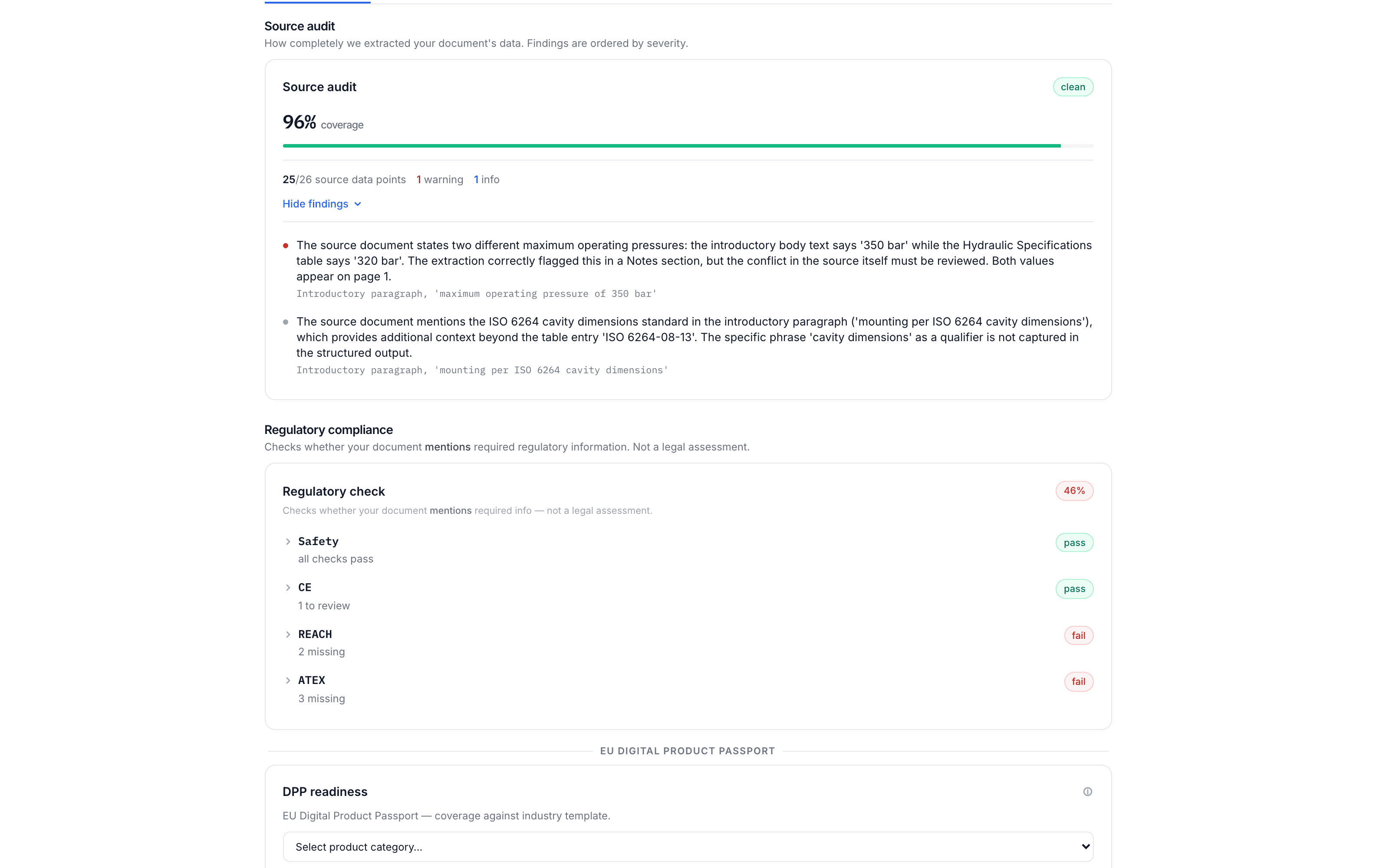
One finding needs a decision, one is informational, and the coverage bar accounts for every data point in the source. Triaging this takes under a minute instead of the 15–30 a manual review would require. And it catches exactly the kind of cross-reference issue (two plausible values, pages apart, that cannot both be true) that manual review routinely misses.
Verifying a flag is a click, not a page hunt: findings that cite the source carry an exact-text anchor, so clicking one opens the original PDF with the quoted passage highlighted. The same goes for every extracted value: each field carries a confidence score and a source anchor, so “where did this number come from?” always has a one-click answer.
Audit Before Translation Prevents Error Amplification
If you’re translating a spec sheet into multiple languages, every error in the source gets multiplied by the number of target languages. A missing value in the original becomes a missing value in 14 translated versions. A unit mismatch becomes 14 documents with the wrong unit.
Running the audit before translation means you fix the source first. The most expensive translation errors are the ones that start in the source document. Catching them before they propagate across languages saves both money and credibility.
This is why SpecMake runs the audit automatically as part of the extraction pipeline, whether or not you choose to translate. Even if you only need extraction and export, the audit runs. For a step-by-step look at how the audit fits into the complete workflow, see our pipeline case study.
Audit as a Compliance Readiness Check
With the EU Digital Product Passport (DPP) requirements taking shape under the Ecodesign for Sustainable Products Regulation (ESPR), product documentation will increasingly need to be structured, complete, and machine-readable. The DPP framework requires product data to be accessible in a standardized format across the product’s lifecycle. The same direction shows up for machinery: the EU Machinery Regulation makes digital instructions the default from January 2027, with a ten-year availability obligation, another regime where auditing the source document for completeness comes first.
SpecMake is the data preparation layer for DPP, and the audit is the readiness check that starts it: if your spec sheets have missing values, inconsistent properties, or unstructured data, those gaps will need to be resolved before DPP compliance is possible. Better to find them now, while the sector-specific delegated acts are still being finalized. For more on DPP requirements, see our guide to Digital Product Passports.